
Input QR Code Data
0 Entries EnteredQR Code Preview
Add up to one line of additional text.
Create QR codes instantly with our free bulk QR code generator
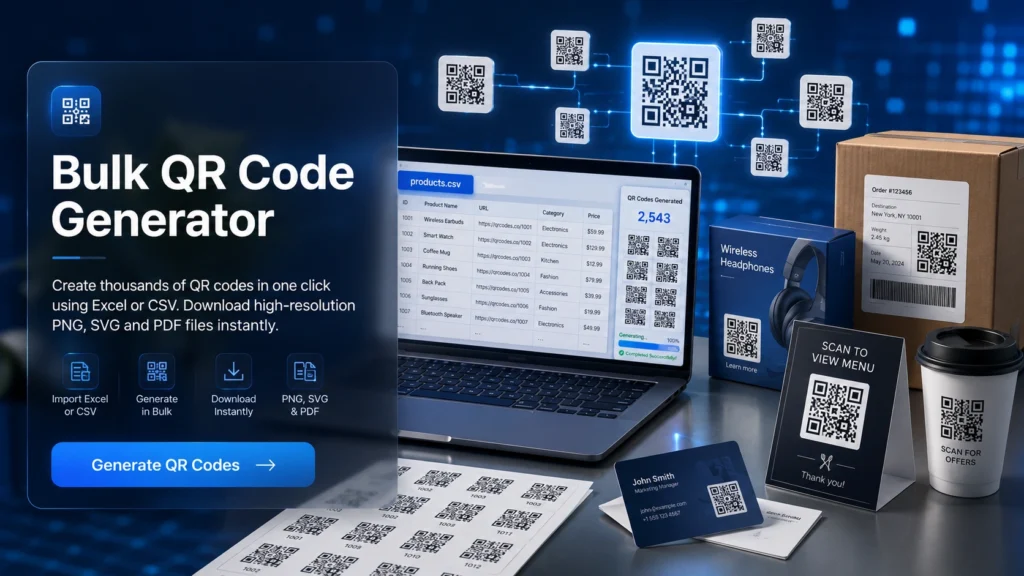
Imagine you are working with large datasets, multiple products, or marketing campaigns. Creating QR codes one by one can quickly become inefficient. A bulk QR code generator provides the best solution by allowing you to generate 500 QR codes simultaneously in seconds.
It helps you manage data more efficiently by automating the entire process. You don’t need to repeat the same manual work again and again. Whether you are working in business, marketing, education, or inventory management, this tool makes your workflow faster, simpler, and more organized. We will guide you on how you can use it accurately.
What is a Bulk QR Code Generator?
A bulk QR code generator is an online software that generates multiple QR codes simultaneously in a single operation. Instead of manually creating each QR code, you simply prepare a dataset containing multiple entries. The system then processes this data and automatically converts each entry into a unique QR code. You can enter:
- Product URLs
- Customer IDs
- Contact details
- Tracking numbers
- Text-based information
Example: If a company has 500 product links stored in an Excel sheet, a bulk QR code generator can instantly create 500 QR codes in one batch.
What are QR Codes?
Quick Response or QR Codes are 2D barcodes that store text or data and can be scanned instantly using a compatible scanner or smartphone. They can hold over 4,000 characters and are widely used for marketing, ticketing, and asset tracking. Once created, the data inside a QR code is permanent and usually cannot be changed.
QR codes were invented in 1994 by Masahiro Hara at Denso Wave. Initially, they were created for tracking automotive parts in manufacturing industries. However, due to their efficiency and high data capacity, they quickly expanded into global usage in multiple industries.
History of QR Codes
QR codes were invented in 1994 by Masahiro Hara at Denso Wave. Initially, they were designed to track automotive parts during manufacturing. Traditional barcodes were too slow and limited in data storage, so QR codes were introduced as a faster and more efficient solution. Over time, QR codes evolved beyond industrial use. Today, they are used globally in:
- Digital payments
- Marketing campaigns
- Event ticketing
- Product packaging
After 2020, QR codes became even more popular due to contactless interactions. From restaurants to online businesses, they are now an essential part of modern digital systems.
How To Use Our Bulk QR Code Generator?
The process of using a bulk QR code generator is easy. You can follow these steps to generate QR codes accurately.
Step 1: Prepare Your Data
First, create a structured dataset using Excel, CSV, or a text file. Each row or line should represent one QR code. The data can include URLs, text, contact details, or any supported format.
Step 2: Upload or Paste Data
Now, import your file into the tool or paste the data directly into the input field.
Step 3: Customise QR Codes
You can adjust several design elements depending on your requirements:
- Color schemes
- Size and resolution
- Logo integration
- Labelling or naming conventions
Step 4: Generate QR Codes
Once the data and settings are finalised, initiate the generation process. Our tool will automatically create all QR codes in a batch.
Step 5: Download Output
You can download the generated QR codes in bulk, usually in formats such as PNG or SVG. You can also get a ZIP file containing all the codes for easy access.
Some Key Features Of Bulk QR Code Generator
Our tool offers many unique features that make QR code creation fast, easy, and efficient. It helps you save time, reduce errors, and manage large data smoothly. Here are its features:
1. Time Efficiency
When you use a bulk QR code generator, you can create hundreds of QR codes in just a few seconds. Instead of wasting hours on manual tasks, you can complete everything in one easy way.
2. Reduced Errors
When you enter data manually, you can make mistakes. With bulk generation, your QR codes are created directly from your file. This reduces the chance of human error. You get more accurate and reliable results.
3. Structured Data Handling
You can easily manage your data in an organized way by using formats like Excel, CSV, or text files. You can also edit or update your file anytime before generating the QR codes. This feature makes your workflow simple.
4. Scalability
As your business or project grows, your need for QR codes will also increase. A bulk QR code generator helps you handle this growth without adding extra workload. You can generate more codes anytime without changing your process. This makes it easy for you to scale your operations smoothly.
5. Cost Effectiveness
Using a bulk QR code generator helps you save money by reducing manual work and time. You do not need extra resources or employees to create QR codes one by one. Everything is automated, which lowers your overall operational cost.
6. File Import Support
It allows you to upload files like Excel, CSV, or TXT directly into the system. This makes your work faster because you do not need to enter data manually. You can simply prepare your file and upload it in one step.
7. High Batch Capacity
You should choose a tool that can generate many QR codes at once. This is important when you are working on big projects. Our tool will not slow down or crash. It will handle large data smoothly.
8. Customization Options
You can customize your QR codes to match your brand or design needs by changing colours, shapes, and adding logos. URL to QR code generator makes it easy to create stylish and professional-looking QR codes in seconds. You also make them more recognizable for your users. You can customize your QR codes to match your brand or design needs by changing colours, shapes, and adding logos. URL to QR code generator makes it easy to create stylish and professional-looking QR codes in seconds. You also make them more recognizable for your users. You can also add your logo to every code in the batch on our dedicated logo page.
9. Labelling and Data Pairing
It allows you to connect your QR code data with labels like product names or IDs. This makes it easier for you to identify each QR code after generation. You do not get confused when working with large numbers of codes. It keeps your data clear and well-organised.
10. Export Flexibility
After generating your QR codes, you can download them in different formats like PNG, SVG, or ZIP files. This gives you the flexibility to use them for printing or digital platforms. You can choose the format that suits your needs best. It makes your work more convenient and adaptable.
Static vs. Dynamic QR Codes
Static and dynamic QR codes may look the same, but they work in very different ways. Static QR codes store fixed information. On the other hand, dynamic QR codes are flexible. Here is the main difference between the two of them:
Feature | Static QR | Dynamic QR |
|---|---|---|
| Editing | Not editable | Editable anytime |
| Tracking | No tracking | Scan tracking available |
| Use | Simple, permanent info | Marketing & campaigns |
| Cost | Free | Usually paid |
How Much Data Can a QR Code Store?
QR codes have the ability to store a large amount of data in a compact format. These are different from the normal bar codes. They just store simple numbers, but QR codes give you the ability to store very complex & diverse information efficiently. A single QR code can hold:
- Up to 7,089 numeric characters
- Around 4,293 alphanumeric characters
- Approximately 2,953 bytes of binary data
Barcode vs. QR Code
You should understand the difference between barcodes and QR codes to choose the right system for your needs. Learn why retailers are moving to 2D codes.
Symbology basics
Feature | Barcode | QR Code |
|---|---|---|
| Structure | 1D (linear) | 2D (matrix) |
| Data capacity | Low | High |
| Scan direction | One direction | Any direction |
| Error handling | Limited | Advanced |
Bulk Barcode Generator vs Manual Creation
Manual barcode creation is suitable only for very small tasks. It takes a lot of time when you need to handle large amounts of data. It also increases the chances of human error and inconsistency.
A bulk barcode generator is a faster and more efficient solution. It allows you to create hundreds of barcodes in a single process. This makes it ideal for businesses that need speed, accuracy, and scalability. You can try qr code generator free download options for quick and easy QR code creation.
Practical Use Cases of a Bulk QR Code Generator
Many different industries use QR barcode generators. In general, a QR code generator is used for industries that deal with a large amount of data and where managing that data quickly and efficiently is crucial. Here are its practical uses.
1. Business & Marketing
QR codes are useful for many aspects of marketing. They include marketing campaigns, product packaging, and customer engagement. Generating QR codes in bulk ensures that there are no inconsistencies in promotional materials and enhances professionalism and organization.
2. Inventory Management
These codes can be used to assign a product with the ability to track, observe, and manage the stock from a logistical point of view. This makes managing ways in which you track and observe stock easier, and it eliminates the chances of human error considerably.
3. Event Management
QR codes are also useful for ticketing. They can also be used for managing registration and checking individuals in. Using these codes makes the whole event experience for the individual attending enjoyable as it cuts down the wait time and organizes the flow.
4. Education
QR codes are useful for sharing assignments and digital resources. Using a QR code to bulk generate resources for large groups eliminates confusion and the need for distorted control.
5. Food and Hospitality
There is a modern aspect to the hospitality and food services industries that makes the use of QR codes beneficial and almost necessary. Restaurants and cafes can use QR codes to let customers view and order from a digital menu. QR code for restaurant menu allows customers to scan and instantly view food items, improving convenience and service speed
6. Data Automation
QR Codes allow for faster data gathering and editing by integrating with your internal systems. They reduce the amount of work done by hand and ensure accuracy in your data systems.
7. File and Asset Management
For better organization, QR Codes can be assigned to files, documents, or digital assets. This saves time and improves efficiency by providing an easy way for you to manage and locate information.
8. Photography Workflow
QR Codes allow for tagging of clients, sessions, and projects on a professional photography job. This alleviates the need for sorting files and the large task of organizing everything post shoot.
9. Supply Chain Operations
QR Codes can be used for shipments, production stages, and logistics workflows. Maintain better control of operations while maximizing visibility throughout your supply chain.
10. Bulk QR Code for WhatsApp
In South Asian countries like Pakistan and India, WhatsApp is widely used for business communication. For example, each QR code can open a WhatsApp chat with a pre-filled message. This makes it easier for customers to contact you instantly. You can use a bulk QR code generator to create WhatsApp QR codes for:
- Customer support links
- Business contact sharing
- Marketing campaigns
- Order inquiries
Common Mistakes When Generating Barcodes
Generating barcodes requires precision, correct formatting, and attention to detail. Even small mistakes can result in scanning failures, data errors, and operational inefficiencies. Some common mistakes are given below that you can make.
1. Incorrect Barcode Type Selection
Each system uses specific barcode formats such as EAN-13 barcode, UPC-A, or Code 128. Selecting the wrong format can make the barcode unreadable or incompatible with scanners and retail systems. It is important to choose the correct type based on your business or platform requirements.
2. Low-Quality Image Output
Barcode quality plays a key role in scanning accuracy. If barcodes are generated in low resolution or appear pixelated, they may not scan properly. This is critical in retail, inventory, and warehouse environments where fast and reliable scanning is required.
3. Skipping Verification Process
One of the most common mistakes is failing to test barcodes before use. Every barcode should be scanned and verified to confirm that it works correctly in real-world conditions. Skipping this step can lead to errors in product tracking, billing, and inventory management.
Frequently Asked Questions
Is this tool safe to use?
How many QR codes can I generate at once?
Can I upload Excel files?
Is this tool free to use?
Can QR codes be edited after creation?
Are QR codes secure?
Conclusion
Our bulk QR code generator makes it very easy for you to create bulk QR codes without any technical effort. You just upload your data, generate 500 QR codes in seconds, and download them for use. It saves your time, reduces manual work, and helps you stay organized. So, if you are using it for business, marketing, or any other project, our tool gives you a fast and reliable way to handle everything.