
Free Bulk Barcode Generator – Create & Download 500 Barcodes
Input Barcode Data
0 Entries EnteredBarcode Preview
Add up to one line of additional text.
If you work with products, inventory, shipping, or online marketplaces, you already know how important barcodes are. Every product needs a unique identifier, and managing them one by one becomes slow and repetitive very quickly. That’s why using an automated tool makes the whole process faster, easier, and more accurate.
A bulk barcode generator helps you create multiple barcodes quickly without manual effort. It is useful for businesses that handle products, inventory, or shipping on a large scale. With this tool, you can generate hundreds of barcodes in just a few seconds. We will guide you on how to generate 500+ barcodes accurately for free.
What is a Bulk Barcode Generator?
A bulk barcode generator is an online software that creates multiple barcodes in one batch. It is helpful for businesses that deal with large amounts of product data. It removes manual effort and reduces errors. Instead of generating barcodes individually, with this bulk barcode maker, you can:
- Paste a list of product IDs, SKUs, or numbers
- Upload Excel or CSV files
- Select barcode format
- Generate all barcodes at once
- Download them in image or document format
Why Do Businesses Use Our Barcode Generator?
Many businesses use bulk barcode generation because manual barcode creation is not practical at scale. The main reasons to use Batch Barcode Generator include:
- It works in your browser, so your product data remains safe and is not uploaded anywhere.
- You can create up to 500 barcodes in one go and download them quickly as a ZIP file.
- It is 100% free to use with no limits, no hidden charges, and no watermarks.
- You get print-ready barcodes that scan easily on phones and scanners.
- You can handle large product data easily without manual work.
- It assigns a unique code to each item for better tracking, and you can create clear and standard product labels for stores and inventory.
- This tool makes shipping and logistics easier with tracking-ready codes.
- You can also create valid barcodes for online marketplace listings.
How to Use the Bulk Barcode Generator? Step-by-Step Guide
If you want to create unlimited barcodes, you have to follow these steps to create hundreds of barcodes in just a few minutes. This tool works in your browser, so your product data, like SKUs or codes, is not uploaded anywhere.
Step 1: Select Input Mode
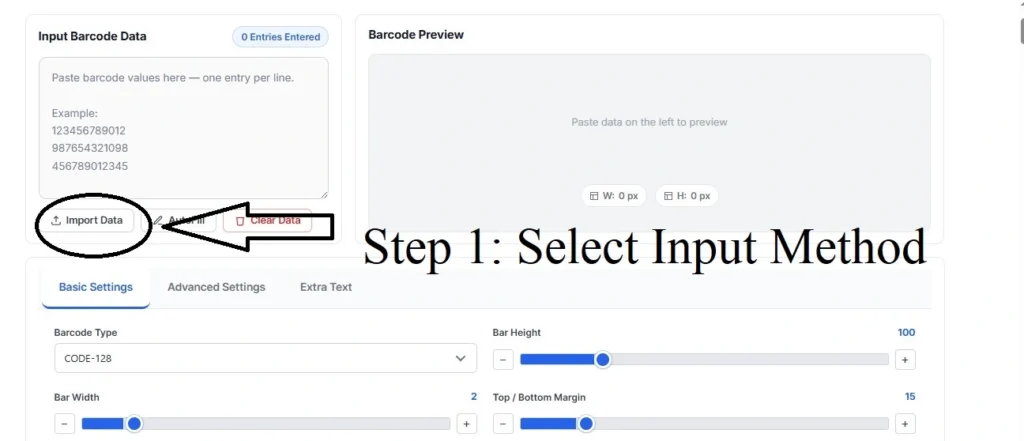
First, choose how you want to add your data. You can use files from Excel, Google Sheets, or any ERP system. You can select:
- Single Barcode for testing
- Bulk mode to paste a full list
- CSV import to upload an Excel or spreadsheet file
Step 2: Choose Barcode Format
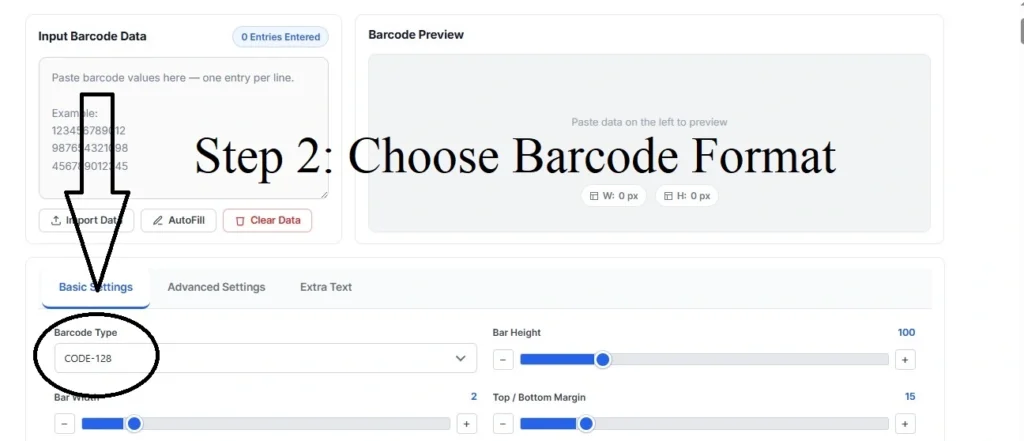
Next, pick the barcode type based on your need:
- Code 128 for alphanumeric product codes
- EAN-13 or UPC-A for retail products
- ITF-14 for shipping cartons
- Code 39, MSI, or Pharmacode for older or special systems
Step 3: Enter Your Data
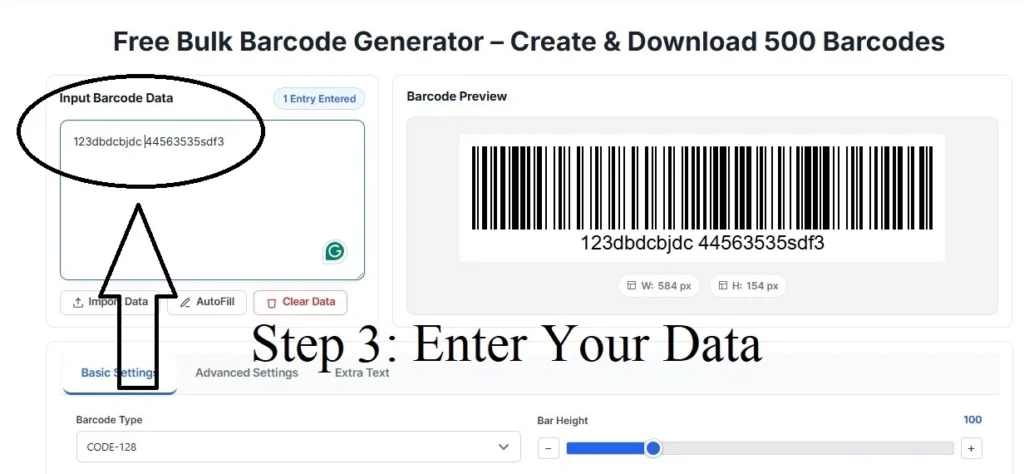
Now add your values. You can do it by following the given steps:
- Paste one item per line
- Add optional labels using a format like: data | label
- Upload a CSV file with data and labels
Step 4: Set Barcode Size
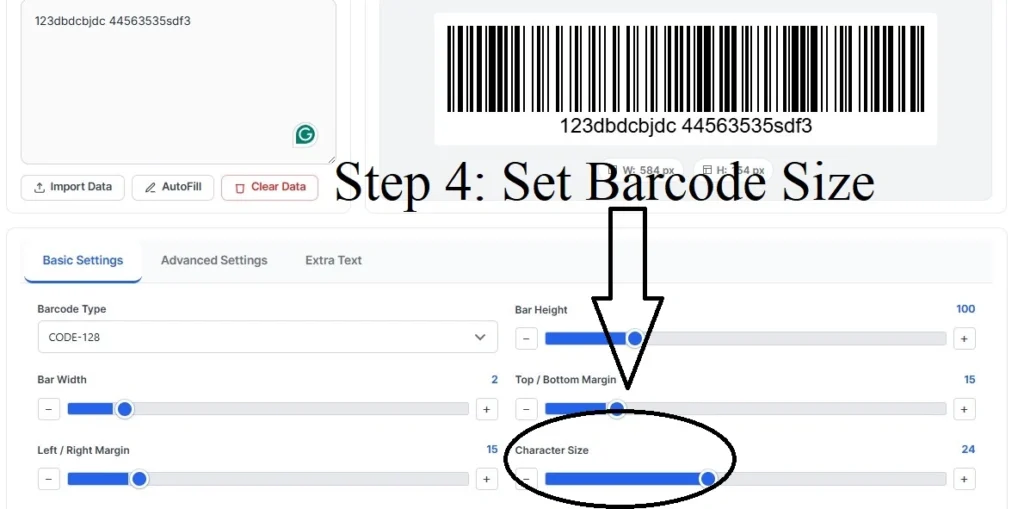
Adjust the appearance of your barcodes. This helps you match print or label requirements. Follow the given steps to do this.
- Choose a width from narrow to wide
- Set height between 50 and 200 pixels
- Next, enable text below the barcode if you want readable values
Step 5: Preview and Check
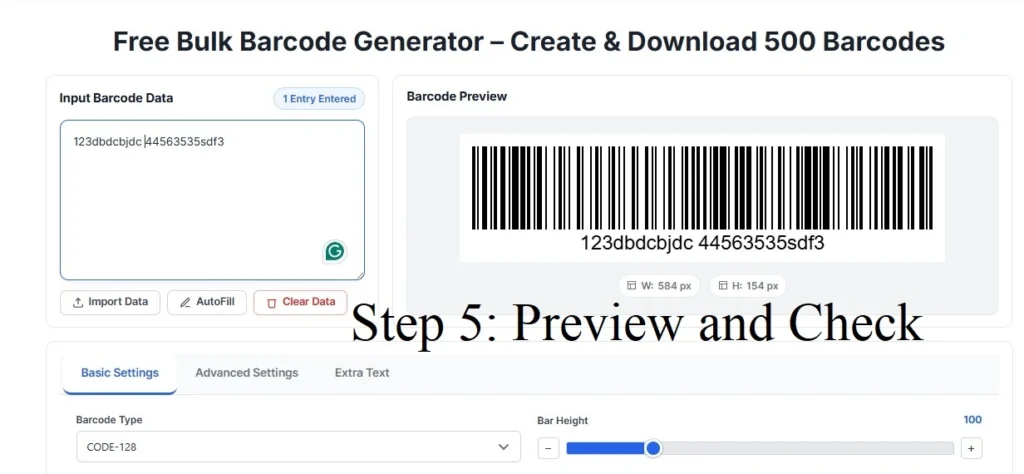
Click the preview option to see your barcodes before generating them. It helps you to avoid mistakes before the final export. The system will:
- Check if each value is valid
- Highlight incorrect entries
- Make sure all format rules are followed
Step 6: Download Your Barcodes
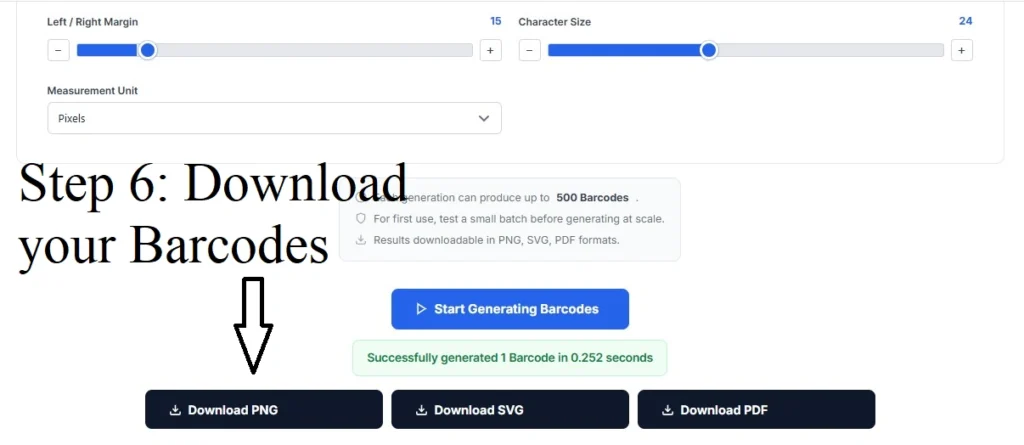
Once everything is correctly added, generate and download your files using the barcode generator bulk download option. You can then print or use them in your system. All barcodes are downloaded in the given format:
- PNG images
- JPG images
- SVG vector files
- PDF sheets for printing
- ZIP files containing all barcodes
Top Features of Bulk Barcode Generator
Our tool is made to help you create barcodes quickly and easily without any complicated steps. It works smoothly and saves your time when handling large amounts of product data. The top features of this multiple barcode generator are given below.
1. Batch Processing
You can generate multiple barcodes at once, rather than creating them one by one. This speeds up the process when dealing with a large number of items. It’s useful for businesses with extensive product inventories. Instead of wasting time on repetitive tasks, batch processing makes barcode creation easy.
2. Excel and CSV Support
You can easily import data from Excel or CSV files, making it unnecessary to enter information manually. Our bulk barcode generator is helpful if you already have an inventory list ready. By integrating directly with your existing system, this tool saves you time and reduces the risk of mistakes.
3. Label Sheet Formatting
Barcodes are automatically organised into grids that perfectly match printable label sheets. This removes the hassle of manually adjusting layouts and ensures that all barcodes are evenly spaced and aligned. It saves time when printing large batches of labels. With this feature, you can quickly print your barcodes without needing additional formatting.
4. Multiple Export Options
You have the flexibility to download your barcodes in various formats such as PNG, JPG, SVG, or PDF. It makes sure that you can choose the best format for your specific needs. It also makes the tool versatile for different business requirements. You can easily adapt the barcode format to suit your system or printing method.
5. Browser-Based Processing
It operates directly in your browser, so there’s no need for installation. This makes it accessible from any computer with an internet connection. Your data stays local on your device, and you can generate barcodes from anywhere. It provides a simple way to create barcodes without the need for extra software.
6. Preview and Validation
Before downloading your barcodes, you can preview them to make sure everything looks correct. It also checks for errors, highlighting any invalid entries before they’re printed. With this feature, you can catch and correct mistakes before they become a problem.
7. Custom Barcode Types
Bulk barcode generator supports various barcode types, such as Code 128, QR codes, and UPC. This gives you the flexibility to generate the exact type of barcode that suits your specific requirements. No matter whether you’re dealing with product identification or mobile scanning, you can choose from a variety of formats.
8. High-Speed Processing
With optimised performance, barcodes can be generated in no time. It makes sure that you don’t waste time waiting for large barcode sets to be processed. High-speed processing is perfect for businesses that need to generate a high volume of barcodes quickly without compromising quality or accuracy.
9. 100% Free to Use
The best thing about this tool is that it is 100% free to use. You can generate unlimited barcodes, export them in different formats, and access all the features without any hidden fees or subscription charges. So, whether you’re a small business or handling larger operations, you can take full advantage of all the features without any cost.
10. Automatic Error Detection
It automatically checks for errors in your data, such as invalid entries or incorrect formats. It flags any issues before you generate your barcodes, to ensure accuracy. This feature helps avoid mistakes during printing or scanning.
What is a GTIN (Global Trade Item Number)?
A GTIN or Global Trade Item Number is a worldwide standard used to identify products in retail and supply chains. It is managed by GS1 and acts as an umbrella system that includes different barcode formats such as UPC, EAN, and ITF-14. GTINs come in different formats based on their digit length:
- GTIN-12
- GTIN-13
- GTIN-14
Each format represents a different level of product identification used across global markets. For example, UPC-A and EAN-13 barcodes are both types of GTINs. Platforms like Amazon, Google Shopping, eBay, and other global retailers require valid GTINs for product listings to ensure proper tracking and identification.
Which Barcode Format is Right for Your Business?
When working with barcodes, selecting the right format is important for effective tracking, labeling, and management of products or shipments. Each barcode format is made to suit different businesses. Here are the barcode formats you may need, based on your specific requirements.
Which barcode type do you need?
| Barcode type | Data type | Length | Where it’s used |
|---|---|---|---|
UPC-AGTIN-12 | Numeric | 12 digits | Retail products in USA & Canada |
EAN-13GTIN-13 | Numeric | 13 digits | International retail products |
ITF-14GTIN-14 | Numeric | 14 digits | Cartons, shipping boxes, pallets |
Code 128 | Alphanumeric | 1–80 chars | Shipping labels, tracking, inventory |
Code 39 | Alphanumeric | Up to 43 chars | Automotive, defence, healthcare |
QR Code | Text / URL / data | High capacity | Marketing, mobile scanning, links |
Data Matrix | Alphanumeric | Up to 2,335 chars | Electronics, medical devices |
PDF417 | Alphanumeric | ~1,800 chars | ID cards, boarding passes |
MSI | Numeric | Variable | Warehouse inventory systems |
Pharmacode | Numeric | 3 – 131070 | Pharmaceutical packaging |
Real-World Applications of Bulk Barcode Generator
Online Bulk barcode generators are widely used across different industries to make work faster, more accurate, and easier to manage. Here’s how they are used in many industries:
1. Retail and E-Commerce
In retail and e-commerce, barcodes are used for product labels, pricing, and online listings. With bulk generation, you can create barcodes for many products at once. This helps in faster checkout, better stock control, and smooth product management.
2. Warehousing and Inventory
In warehouses, barcodes help track items, shelves, and storage areas. Bulk barcode makes it easy to label everything quickly. This reduces errors, improves stock visibility, and makes inventory management more organised.
3. Logistics and Shipping
Shipping companies use barcodes to track packages and deliveries. Bulk generation allows you to create many tracking labels in less time. This improves delivery speed, tracking accuracy, and overall logistics operations.
4. Healthcare
In healthcare, barcodes are used for patient identification, medicines, and lab samples. Bulk barcode generation helps label everything correctly, which reduces mistakes and improves safety. It also makes daily operations more efficient.
5. Events and Ticketing
For events, it is used on tickets and entry passes. It helps you to create thousands of unique codes quickly. This makes check-in faster and helps manage large crowds easily.
6. Manufacturing
In manufacturing, it is used to track materials and finished products. Bulk generation helps label items across the production process. This improves tracking, quality control, and overall workflow.
How to Get the Best Results? Tips & Tricks
To make sure your barcodes are accurate and work properly, it’s important to follow a few guidelines while using the tool. Here are some tips and tricks you can follow to get the best results while creating barcodes with our tool:
- Always check your data format before generating barcodes to avoid errors.
- Use Code 128 when you need maximum compatibility for different systems and scanners.
- Add clear labels to your barcodes so you can easily identify products later.
- Test a few sample barcodes before printing a large batch to ensure proper scanning.
- Use high-resolution settings if you are printing barcodes for professional or retail use.
- Keep a backup of your barcode data so you can reuse or regenerate it anytime.
Frequently Asked Questions
Is the bulk barcode generator free to use?
Can I generate barcodes from a CSV or Excel file?
Can I print these barcodes on label sheets?
Which barcode format should I choose?
What is the difference between UPC, EAN, and GTIN?
Are the barcodes scannable and safe to use commercially?
Is my data uploaded anywhere?
Does the tool work offline?
Which barcode type should I use for Amazon?
How many barcodes can I generate at once?
Wrapping Up
A bulk barcode generator is an important tool for any business that handles multiple products or inventory items. It replaces manual work with automation and ensures accuracy at scale. Instead of creating barcodes one by one, you can upload your data, select a format, and generate more than 500 codes in seconds.